Showing posts with label Learning Spaces. Show all posts

Tuesday, November 3, 2015

Thoughts on Makerspaces #MakingMatters

Since last year, I've been diving into the world of Making. It has been exciting and it has also been a large amount of extra work, but it matters. I just wanted to share a few stories as to why it matters so much.

Quick Background:

My librarian and I have worked together to create an open Makerspace for students to use in the library. It is available to students to use before school, during lunch, during study halls, and after school whenever the library is open. The idea is to give students access to tools on their own to see what they will create. It is meant to be student driven with some nudging from teachers to encourage students to explore different things. We have a 3D printer, Makey Makey kits, Chromebooks, and are stocking the space with more goodies based on student requests. To use the space, the students have to attend and orientation that covers the different tools available and the use of the space.

Story 1:

Solving Meaningful Problems


Here is a picture of a student using the dry erase wall to start her design process. She has an issue with her knee. Her kneecap does not stay in place. It moves around and can be very painful and tough. She is an athlete and has not found anything to help her with this issue. When she came to the Makerspace, she jumped into solving this issue for her. She was working on designs and is close to a prototype of this new brace. She says that there are many people that deal with this condition and she wants to help those people with her creation. She has spent her time working on this project and has said that the space has allowed her to think about this issue and explore possible solutions. She would not have been able to do this without a space that encouraged her to explore a solution to her problem.

Story 2:

Doing Good


This is a great picture of two students who have been spending their lunch time sitting in the Makerspace trying to do something good. They are trying to design a prosthetic hoof for horses. Off all of the things that I expected to see in the space, this never crossed my mind. That is what makes the space so amazing! Students are going to create and do things that we could never imagine and that is what learning is all about. They have spent time researching and diving into the world of assisted technology to see what they would need to do to create this device for horses. I can't wait to see their 3D designs and printed models. Their passion for this project exceeds anything else they are currently working on in school.

Story 3

Fitting in

I run the orientations for the Makerspace. I meet with the students in groups and go over the different things they need to know about using the space. On two different days, I worked 1:1 with two young ladies that were interested in the space. Both of them were very excited  about doing different things and even had ideas for projects. There were two comments that stood out to me when I was talking to them separately.

Girl 1: This is heaven for me. I finally have someplace to go and think about all of the things I want to do. Then, I can do them!

Girl 2: I finally feel like I fit in. I felt weird about liking this type of stuff (making stuff, technology, etch.), but not anymore.

It was tough holding back the tears and the want to give them a huge hug. Everything I had hoped for the Makerspace to do, was happening and these two young ladies put words to it. I wanted to create a space for students to come, tinker, create, and most of all, just be themselves. These students made me feel like I was winning education on those days.

Making Matters:

Making Matters because it gives students, all students, a space to explore the world that our rigid curriculum does not cover. It gives them a community of like-minded people to explore the world. It provides them access to tools they will not use in any other class. It shows them they are not alone in wanting to get their hands dirty and just make something.

We give our students a sandbox and toys to be creative and play when they are younger, but we take that all away as they age. For my high school students, the Makerspace is the new sandbox and I want them to come in, play, create, and most of all, get their hands dirty.

Please share your stories of why Making Matters in the comments section below.

Hugs and High Fives,

Nick

Saturday, February 28, 2015

MarkIt Up In Our Makerspace

One of the things I have been working on the past few months is turning a space in the library into a Makerspace. Part of that process is finding the right furniture and tools to place in the space so students can be as creative as possible. One of these tools is the MarkIt Up table from BeyondTheOfficeDoor.com. It is a 3 in 1 dry erase table that allows users to use it as a table, standing desk, and a dry erase board. It is a first of its kind.

I was very lucky to have BeyondTheOfficeDoor.com send me one for the purpose of the review and to help us create a space for our students. The first thing that stands out about this great table is the fact that it can be raised and lowered electrically. It can meet the height of any user. The height adjustment range is from 27" to 47". Once the table is assembled, just plug it in and get to work. The table moves up and down with two simple buttons to press. That is not the only thing that table can do.

The table can be flipped up to become a board to present the work you have done. Here are some pictures of the table in table form and flipped up in the board view. The easy lock mechanism is perfect to keep the table in the board position and it allows for a simple pull to move it back down to the table position. The transition is easy and great when people want to share their work with others.

The other nice part of the table is that the height can be adjusted. If there are taller or shorter students who need to work on the table, they only need to press the buttons to raise or lower it to fit their needs. It is also nice for those students who want to stand and work at the table instead of just sitting. It is better for students to stand and work at times and the MarkIt Up table allows students to do that.


We are currently using the table to help design the physical space in the library and to take notes when we meet. We then take pictures of the work when we are done and can erase the table for others to use next. The table is also on wheels, so that makes it very easy to move around the space and work wherever we need to. We truly envision this table playing a large part in the space as students work to create exciting projects to share with the school and the community. 

Here is a quick video showing the Markit Up in action. 


The dry erase markers worked wonderfully on the table. We were able to write, erase, and write again without any staining or shadowing on the table. It is perfect for quick brainstorming or long term writing. Here are some shots of table in action and some of our work. 


The MarkIt Up table retails for $1,299.99 and is a nice investment in a space that is going to have many students in and out planning big and small projects. I'm looking for tools and furniture that will support creativity and collaboration. The MarkIt Up table meets that criteria easily. I reccommend you check out the MarkIt Up table for your learning spaces. 

For more information on the MarkIt Up table, follow the link

Wednesday, September 24, 2014

Mobile Lectern To Support #LearningSpace - #NerdySpaces

I'm really excited to share about the Oklahoma Sound Corp® Smart Cart that was sent to me by the awesome people at Quill.com. They read my posts and tweets on creating better #NerdySpaces for my students and wanted to help. 

One of the things I wanted to do was open up more space for my students and for myself. One of the ways I did that was by eliminating the teacher desk and the cabinets. Once those were removed, I had so much more room to move my desks around. I was able to set up 4 areas for student that look like conference table designs. It gives me tons more room to move around the middle of the class. One of the students said they really liked it because it made class more social. That was a huge endorsement for me. However, I found myself still needing a place to put a few important items in my class. I needed a spot for my laptop, iPad, and just a few other things that I use regularly in class. That is where the Oklahoma Sound Corp® Smart Cart from Quill come in and saves the day. 

The traditional lectern is something that I have used for many years. It was a place for me to stand and talk to the students all class. Over the past couple of years, I have found that I do not use the lectern as much as I used to. The stationary aspect of the lectern was the major problem. When I moved things around in my room, I realized I had more space and I would love to be able to move freely with the tools that I need. 


Here are a few photos that show my current setup. I am able to have my HP Chromebook on top along with my Evernote Post-Its and my Evernote Moleskine notebook. I am able to move freely around the room, look at my lesson plans, take notes, and roll from table to table to engage with my students. I am able to have conversations with my students and take notes on anything I might need to address with them later on in class. In the past, I would have to maneuver around multiple desks and avoid a mine field of bags and chairs to get to each student. It was an event that often ended in awkwardly bumping into students as I tried to move around. 

By moving the teacher desk and other items out of my room, I have opened up the room to movement and that has led to more engagement with my students. That has been key. The mobile lectern now allows me to move more freely around the room. With a wireless mouse and keyboard, I do not even have to stick to the front of the room. I can move around and still keep information on the board. I also can carry the gigantic textbook with me as I move from table to table as well because there is a cool little shelf that flips up and down. 


I love the Oklahoma Sound Corp® Smart Cart and it has made my class better. The freedom it gives me to move around and keep the important items I need for class is a difference maker. Here are just a few more things that I love about it. 

  • It comes with a power cord so that devices can be charged at night. I just wheel it over to an outlet, plug it in, and let my devices I've connected to the power strip charge. 
  • All of the doors come with locks so all of my devices can be safe when I leave them to charge over night and I can keep my phone, wallet, or anything else in a safe place while I teach during the day. 
  • The desk top slides open for more storage space. I love being able to keep my books or laptop in there for easy access. 
  • Lightweight to move around and it was very easy to assemble. 
If you are looking to change the way your class flows, if you are interested in creating learning spaces in your classroom that allow more freedom for the students and the teacher, you need to consider ordering a Oklahoma Sound Corp® Smart Cart from Quill.com right away. 


Disclosure of Material Connection: This is a “sponsored post.” The company who sponsored it compensated me via cash payment, gift, or something else of value to edit and post it. Regardless, I only recommend products or services I believe will be good for my readers and are from companies I can recommend. I am disclosing this in accordance with the Federal Trade Commission’s 16 CFR, Part 255: “Guides Concerning the Use of Endorsements and Testimonials in Advertising.)

Thursday, July 10, 2014

Reflecting On My Current Classroom Setup #NerdySpaces

I spent a couple of hours in my classroom today taking pictures, sketching ideas, and annotating those pictures on my iPad using Skitch and Evernote. Here were my thoughts as I looked at my room. (Caution: These are just rough ideas, not final decisions.)

I'm going to start with the stage area in my classroom. This is the area that students love the most and tend to congregate before and after class. It is also the center of group work for most students if they can claim it before anyone else. The chairs have been collected over the years and student love to sit there and work. The whiteboard areas always change during the school year and the door is painted with IdeaPaint and it is called the Dream Door. Student can post thing they hope to accomplish during the school year. As I looked at the space, I took down some ideas. 


The stage used to be the center of my Blogger's Cafe idea from a few years ago. I moved away from that because the students had their own devices and they didn't need to be there to have access to their blogs. The chairs stayed and the iPad cart was added. A few more chairs were added, but the space has gone unchanged for the most part. The answer to my classroom space issues have been staring at me from the stage for a few years. Instead of viewing the stage as a special area to lounge and work, why didn't I see that the entire room should be like this? Despite how innovative or progressive I try to be, there are elements of the "old school" mentality that stick with me and are hard to break. 


The front of my room needs some serious changes as well. Here is what I realized while staring at the front of my room like a student would in class. 


I have wasted so much space in my room because I had the wrong idea of what a classroom should look like. "All eyes up front" is not the way to go about designing the classroom. That makes the learning environment about me and it should not about me at all. Even when the desks are moved into a table formation, students are constantly adjusting their seating to make eye contact with the speaker. 

I move all over the room, yet I set everything up to make the front of the room the focal point. It doesn't even make sense. I spend time dodging stray backpacks as I walk the room and students are turning every which way to keep me in their view. This formula is a huge fail. 

Here are a few more shots where I suggest some changes. I hope I can make them. 


I have all of this board space that should be used in class by my students on most days. I need to arrange tables and chairs around those learning hubs so the students can collaborate freely without having to get up and go to the library or the hallway to get comfortable. 

I would like to see each part of the room that has something a little different and special that could accomodate the different types of learners that come in and out of my room. Maybe a couple of the areas have screens for students to plug in their device and work collaboratively on a computer. Maybe another spot features dry erase boards and desktops so they can map out their plans with markers. I think there are so many different possibilities if I take the time and figure out what is best. 

Once I get some ideas set, I'm going to reach out to some students for feedback and see what they think about the learning space. 

If you are a vendor interested in helping me create the #NerdySpaces for my students, please drop me a line on Twitter (@TheNerdyTeacher) or though email OneNerdyTeacher@gmail.com.

#NerdySpaces - My Project for 2014-2015

Every year I decide on a project that I'm going to focus on and share on my blog. Last year it was 20 Time, the year before it was an Epic Evernote Experiment, and I documented the Epic Romeo and Juliet Project from 4 years ago. This year, I'm going to focus on creating a better learning environment by create spaces that are more conducive to modern teaching and learning.

I'm going to be calling these #NerdySpaces and I will be using this blog to document the changes that take place in my classroom. Today I will be heading to my room to take a bunch of before pictures to document what my room used to be and I'm going to start brainstorming on what I would like my room to be. Here are just a few of my random thoughts.

I want to ditch my teacher desk. I've always sectioned off a part of my room that is the teacher area and students are not allowed. I'm not sure why I do it, but I've always done it and I want to stop. I want the entire space to be open and accessible to all of the students. My desk tends to just hold stuff I barely use anyway. I will miss the IdeaPaint top I painted for the desk, but I feel I can do something different if I push myself.

I want to dump the chair/desk setup and move to tables or desks that are more easily moved to create group work stations. I've seen some cool things from Steelcase and Bretford. It is more than time to rethink what the classroom looks like.

I teach in a 1:1 iPad classroom, but I feel like I still teach too much from the stage. Part of that is the environment I teach it that is designed to have students looking to the front of the room at me or the student presenter. I need to reconsider the "center" of my room and how a new layout might promote more collaboration and better learning.

I want students to have a say in what the classroom is going to look like on any given day. I want the flow of the room to be dictated by the learning, not the learning dictated by the flow of the room.

There are so many possibilities, but time is short. I want to have the new room set up by the time I start school in September, but that might not be possible. I need to find some sponsors that are willing to go with me on the crazy adventure and support new ideas. I'm blessed to be in a building that has always supported by ideas and I can wait to see where this project takes me.

I learned from my students last year that it is ok to dream big and fail big. This might be one of those times, but I'm not going to let that get in my way. Stay tuned for updates over the course of summer as I figure out what my room is going to look like.

Please feel free to leave me comments below with suggestions on articles to read, vendors to contact, or anything else that could help me create the best #NerdySpaces for my students. If you are a vendor and you want to partner with me for this great experiment and be featured on my blog for the year as I write about the awesomeness that is my room because of you, please send me an email at OneNerdyTeacher@gmail.com.

Thanks everyone!

Nick

Wednesday, March 19, 2014

If I Had A Sledgehammer - Thoughts on Learning Spaces #EdChat

During my time in Los Angeles this past week, I had an amazing opportunity to visit a couple of spaces that made me drool. I was given a tour of YouTube Space LA and Soulpancake offices. After seeing how they design their work areas and why they designed them that way, I just want to take a sledgehammer to my 80 year old room and start from scratch. (Don't worry South, I would never do that. I just wish I could.)

I've actually written about Learning Spaces before on my blog after I visited Evernote's office. Check this post for some similar thoughts.

Sadly, I do not have any pictures to share because I did not take any. I was so blown away by the spaces, I got lost in the tour and was just soaking everything in. I will do my best to share what I saw and explain the value I see in the design for classrooms.

First, I want to talk about the YouTube Space LA. This is a large aircraft hanger that was converted into a workspace. It was gutted and space was created for all aspects of video creation. Rooms were designed for filming, hair and makeup, viewing rooms, post production equipment, and anything else you might need to produce a top notch video. The lobby is something that stood out to me. It was a general meeting area filled with chairs and couches of all shapes and sizes. Everyone could just get together and connect. There is a large video wall that is showing social media mentions of the Space and featured YouTube content as well as a large screen opposite that can be used to show other videos to larger groups. The space is designed to be flexible. They do not know what they might need to use the space for on any given day, so everything can easily be moved or shifted based on a specific need.

This is not how schools are designed and they should be. Too often, teachers are stuck designing lessons based around a very rigid physical environment. Student desks are not conducive to collaboration. Have you ever tried to work as a group in the single module desks? It is awful. Rooms need to be designed in such away that allows for students to work solo if they need to or work in groups. I have desks that are separate from chairs, so students can easily move them around when they need to get to work on various projects. The more flexible the classroom can become, the more creative students and teachers can be because they can now create in environments that foster that innovative spirit.

The office area of the Space was designed in a similar fashion to Evernote's offices. Cubicles cannot be found in these areas. Everyone shares an open room with their work stations. They have desks that can be adjusted that allow people to stand and work or sit when needed. There are smaller conferences rooms that people can use for meetings or some quiet space. Again, the space allows for people to make it what it needs to be for them and their current situation.

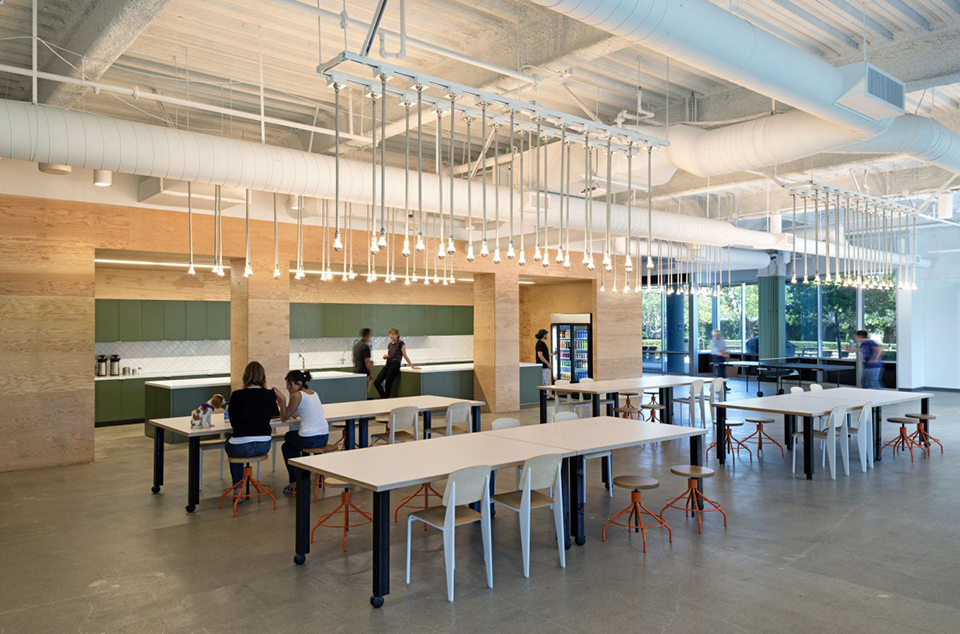
The common room is the kitchen that has all of the snacks that a person could need to keep them going through the day. This is a great place for those informal gatherings that can lead to amazing creations and ideas. I would love to see these spaces created for teachers. I know there are some lounges for teachers to meet in schools, but are they fully stocked with snacks and drinks for teachers? Are they designed to be inviting for teachers to have impromptu collaboration? Can you bring your laptop to get work done or jump on a Google Hangout to connect with another teacher across the country to collaborate on a project?

I also saw the idea of collaboration spaces at the SoulPancake office. YouTube Space LA and the SP offices are very different in many ways. Size alone stands out as the biggest difference, but the philosophy of work spaces was still there despite the fact that the scale was different. There is a space for the big meetings and there were some work stations scattered around the small office, but the central hub of the workflow as the main table next to the kitchen area. My friend Georgia said that she had a tiny area in the corner that was her desk, but she mostly worked at the table to connect with everything going on in the office.

When I first arrived at the office, all of the energy was centered around this table as final plans for a project were being sorted. At the end of the visit, for different people were sitting around the table working on various projects and sharing stories and ideas. It was a place for free flowing communication and collaboration. While the size of the SP offices could fit into the YouTube Space LA over 20 times, the idea of what is important in a workspace is still there.

There is so much more I could go into about the value of a green space and incorporating natural elements to breathe life into a work space. The draw for teachers to leave the classroom for startups and other companies that embrace these ideas makes sense when you spend just a few hours in these offices. Their is a great energy and feeling when people are passionate about their work and have an environment that supports that passion.

Space needs to be set aside to allow people to create and collaborate. The majority of the classrooms around this country were built to support a now antiquated style of industrial education. I hear time and time again about the need to change the way students approach problems and the value of collaboration. Yet, schools still give the same environment that does not support those goals. While it can be very difficult to change some schools due to their age, conversations need to start about how to support environments that foster creativity and collaboration. Here's a thought, why not ask the students?

Monday, November 12, 2012

I Could Start a School In Evernote's Offices Today #EvernoteLife

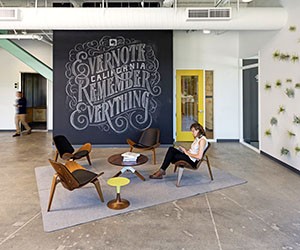
I've been reading articles on Learning Spaces the past year. Lots of pictures of cool new designs and floor plans for these new schools. I would read and look at the pictures and nod my head in agreement. For me, it was still theoretical. I needed to see it first hand. This weekend, I had the chance to see innovative learning spaces, but it wasn't at a school.


I spent the day at Evernote's office in California. It was awesome. I got to meet the amazing staff I worked with over the interwebs and CEO Phil Libin (@plibin) stopped by with his awesome Empire Strikes Back coffee mug to chat with all of the ambassadors and to just see how things were going. From start to finish, the entire day was an awesome experience that really got me thinking. I could actually start a school with the set-up Evernote uses in their offices.

The traditional school layout is based around classrooms. Each classroom is designed for one teacher to teach 30 students in a particular content area. Classrooms that have similar classes are located in the same part of the building. All English teachers are in the the North end of the building, Science in the South end and so on. Kids shuffle from one class to the next every 45 minutes or so to get instruction on the next subject. This format seems to have "worked" for decades and there doesn't seem to be any serious push to change it. The way Evernote laid out their offices is the exact opposite and I think it has something to do with their success.


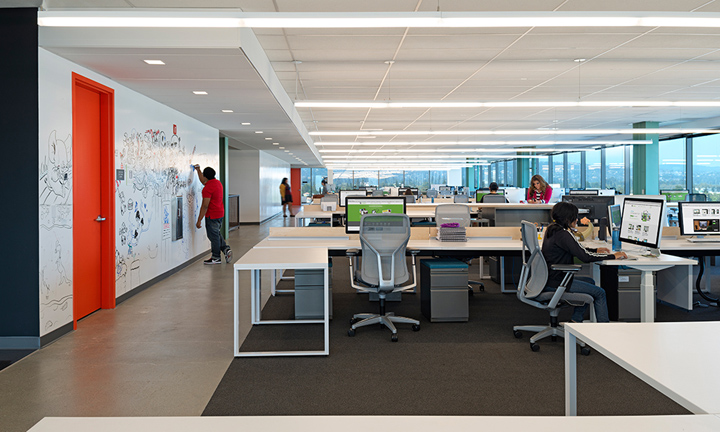
Evernote does not lump departments all together on one floor in cubicles. The layout is open floor where all of the different departments are mixed in together. Designers sit with programmers who are sitting next to sales who are across from PR. The design encourages people to get up and move around and to work with others in different departments easily.

Why is this not done in schools? There has been plenty of talk about cross-curricular needs, yet we section departments off from one another. If students stayed in one part of the building and had access to all of the different departments in one spot, might that encourage stronger bonds between students and teachers? Wouldn't schools see great collaboration between the arts and sciences if they shared a hallway? These are important questions to ask. If schools want collaboration across the curriculum, space needs to be utilized to accomplish it.

I could not find a cubicle in the building. I tried my hardest to find one, but all I found were desks and work spaces. The open format allowed for easier communication from one person to the next. I saw employees working across desks and huddled over drawings without the confining feeling of a cubicle. Cubicles are just the business world's versions of classrooms. Do you know anyone that actually likes working in a cubicle? I didn't think so.

When employees need to work or have a meeting a more private settings, the offices are filled with conference rooms of all sizes. Some are large board room types with the long table, but others are small meeting rooms that sort of resemble the confessional booths from Real World, only a bit bigger and with less crying.


Yes, the conference rooms are named after video games. Each floor is assigned a letter and the video game named rooms are based on that letter. Awesome. Room numbers are so lame. I need to come up with a name for my room and cover the room number with it. I guarantee kids will remember where my room is now.

I think the idea of rooms for meetings when meetings are needed is great. The open space area allows students to work and collaborate when needed. When something a bit more private is needed, presentation planning, student conferences, etc, they can be used. If we really want students to be independent thinkers and learners, we need to provide them the space that encourages this model. The traditional classroom is still geared toward the teacher as the sage on the stage. Even and I move to a more collaborative environment in my classroom, the projector still faces the front of the room and the students still look to me as the hub of information.

The other big things I loved about Evernote's offices was the fact they covered just about every surface with Ideapaint. Ideapaint turns any surface into a dry erase board. Desktops and walls are now a canvas for people to brainstorm and plan.

There were other walls filled with notes from meetings employees used that I cannot share, but there were elements of fun and work everywhere I turned. Ideapaint allowed Evernote to utilize all of their space and not waste paper for simple brainstorming meetings. Many of us still like to write things down to help us through a thought process. Ideapaint is perfect for just that. Best of all, Evernote can take the pictures of the work and save them right into a note. Clean the wall and start all over.

At the end of the day on Fridays, they have a gathering of all employees to share a snack and a drink. In most places, people are out the door, but you can sense the environment is different. Teachers are out the door to their local watering hole the minute the end of the day bell rings on a Friday. Doesn't that same more about the school environment than it does the teachers? If the school environment was better for teaching and learning, would teachers and students hang around to get more done? If schools offered S'Mores like Evernote did when I was there, you might have more people after school willing to help.


The biggest push back I see is from teachers who think our students can't work in such a free flowing environment. To them I say, "Yes, you are right."

However, that's not the students' fault. They do not know any better because we are not preparing them for a world that is starting to look more like Evernote and less like the classroom. If we do our job as educators, our students will not only be successful in these new environments, but they will be innovators and leaders.

I had the best time at Evernote and I can't wait until I get to go back and work with these great people. These are the types of people we need thinking about education reform. If you haven't checked out Evernote, you are missing out!