Showing posts with label Adobe Creative Cloud Express. Show all posts

Monday, April 10, 2023

5 Quick Ways to Enhance Your Classroom Creativity with Adobe Express #AdobeEduCreative @adobeforedu @rebeccalouhare

Adobe Express is a powerful tool that provides a variety of creative options for students to explore in the classroom. From photo editing to social media content creation, Adobe Express offers a range of features that can help students bring their ideas to life. In this list, we will explore 5 quick ways to use Adobe Express in the classroom, including photo editing, digital storytelling, presentations, graphic design, and social media. With these tools, students can develop their creativity, enhance their visual communication skills, and create engaging content for a range of classroom projects and assignments.

1. Photo Editing: Adobe Express is a great tool for editing photos, which can be useful in classroom projects or assignments that involve working with images. Students can use Adobe Express to crop, adjust brightness, contrast, and saturation, apply filters, and add text to their photos.

2. Digital Storytelling: Adobe Express provides a range of creative tools that can help students tell their stories using visual elements. They can use the app to create collages, mood boards, and photo essays, as well as add text and graphics to their projects.

3. Presentations: Adobe Express can be used to create visually engaging presentations. Students can use the app to create slideshows and add text, images, and graphics to their presentations. They can also use the app's design tools to create custom templates and layouts.

4. Graphic Design: Adobe Express provides a range of graphic design tools that can be used in the classroom. Students can use the app to create posters, flyers, and other visual materials. They can use the app's design tools to create custom graphics, add text, and choose from a range of fonts and colors.

5. Social Media: Adobe Express is a great tool for creating social media content. Students can use the app to create graphics and visuals for their social media accounts, such as Instagram, Facebook, and Twitter. They can use the app's design tools to create custom templates, add text, and choose from a range of filters and effects.

Adobe Express offers a wide range of creative options for students to explore and enhance their visual communication skills. By utilizing the various features discussed in this list, students can unlock their full potential as visual storytellers and content creators. With continued practice and experimentation, they can discover new and exciting ways to use Adobe Express to enhance their learning and personal development. Whether they're working on a class project or pursuing their own creative interests, Adobe Express can help students bring their ideas to life and communicate their message effectively.

Monday, September 12, 2022

Cutting Board Challenge #MakerEd #AdobeEduCreative

We are starting the school year with some fun challenges in our Innovation and Design Level 2 class. I really want to focus on physical making with digital making as a support and design tool. Our first project will be using Adobe Creative Cloud Express to create their own logo. From there, we will use the laser cutter to put their logo on a keychain. Here is my example I will be using with the students,


From here, students will be design their own themed cutting board. I was able to get a bulk order of 5"x8" bamboo cutting boards for the class from Amazon. Students will design a PNG in ACCE and we will use the laser cutter to etch the design. Their logo will go on the back. Once they have created their cutting board, they will need to create an ad for it. Here is my example,


One of the things I trying to do this year is not make my examples over the top. I spent lots of time on other examples in the past and I had students say they would not be able to match my example. I think that impacted their effort. For first time project examples, I'm going to scale back the examples until I can use student examples. 

All of these examples and projects will live in their portfolio on Seesaw. By the end of the trimester, I hope to have each student with a collection of their design work. 

Feel free to share some thoughts and ideas on how I could tweak this to make it better. I appreciate all of the feedback. 

Hugs and High Fives, 

N Provenzano

Monday, May 9, 2022

Podcast Design Project #MakerEd #AdobeEduCreative

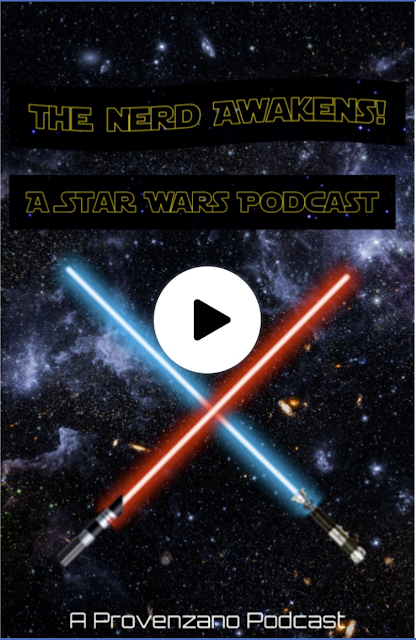
Hey folks! I wanted to share a fun project that I have assigned my students that uses Adobe Creative Cloud Express and Seesaw. Students will use ACCE to create an ad for a fake podcast they will create. Below are the directions for the assignment. 


For this activity, you can partner up if you'd like to create an ad and a sample of what your podcast would be about. Follow the steps below to complete the activity. Step 1: Decide whether or not you want a partner for this activity. Step 2: Brainstorm possible idea for a podcast topic that you think people would find interesting. Step 3: Come up with a script for a short clip of this podcast. It should be around 3-4 minutes in length. Step 4: Design an ad to promote the podcast using images that connect to your script. Step 5: Create the ad in Adobe Creative Cloud Express. (express.adobe.com) Step 6: Post the ad to Seesaw and record the podcast clip on the same page. Step 7. Post the script you wrote for the clip. Podcast Ad Requirement: Name of the podcast. Images that connect to the topic of the podcast. Names of the people hosting the podcast.

Here is a link to the assignment that has my example.


The students dove in and I can't wait to share the work they have created for the podcast assignment. 

Hugs and High Fives, 

Nick