Showing posts with label Robotics. Show all posts

Wednesday, August 22, 2018

Applied Robotics for Middle School from @WonderWorkshop #MakerEd

I've seen my students play with Dash and Dot as well as the Cue from Wonder Workshop over the past school year. They had so much fun working with the Sketch Kit and learning to code to create art. They loved it so much, they featured it on their new YouTube Channel, The Knight's Forge Maker Show.


My son Leo, was a huge fan of the CUE when I introduced it to him a couple of weeks ago. He could not put the iPad down and just loved making the robot move around the kitchen floor. When I asked him what he thought of it, he said, "This is the coolest robot I have ever seen!" That is a pretty awesome endorsement from The Nerdy Teacher's son. At age 7, he was easily able to navigate the Blockly coding and follow the tutorials on the app to test out all of the sensors and move CUE around. Seeing him so engaged and work on his reading skills as he read the prompts was just an awesome sight. 


I have always been a fan of using robotics as a way to connect students with coding. It gives the students something tangible to work with as they code. Seeing a robot move, sense, or say something because you coded it is something amazing. Just having reactions on a monitor based on the code you wrote can become tiresome over time. That is where the CUE takes coding and computer science in general to the next level. An awesome product and an easy to use app was not enough for Wonder Workshop. They have taken it to the next level by introducing a Middle School Applied Robotics Curriculum


There is a myth that teachers need to be computer programmers to bring coding into their classroom. The idea of considering coding as part of your class could be scary if you have never coded before. Wonder Workshop helps take that fear away by creating a curriculum that can be implemented by any teacher with any skill level in coding. 

Another aspect of the curriculum they have created focuses on the Design Thinking Process. This is so awesome because the curriculum is not just about making a robot move around on the floor, it is about the full design process from start to finish to get students thinking about solving problems with creative solutions. Going through the Design Thinking Process for Applied Robotics lessons will help students in all other content areas as well. 

Wonder Workshop Design Thinking Poster

Unit 1, which is available right now, is about Creative Writing! The ELA teacher in me freaked out when I saw this. Yes, robotics can have a home in the ELA classroom! What a wonderful way to engage students in the writing process. I would have lost my mind if I was able to code robots in my English class growing up. I would have spent hours writing the best story in the world to have my robots do what I wanted. The first unit connects with Geometry and helps students connect with the basics of coding in Blockly and Javascript. It is a wonderful way to introduce the idea of robotics and what coding is capable of doing with a robot.

The full curriculum guide has a rubric, guided lessons, worksheets (Not the busy work kind, the type that allows students to brainstorm, create, iterate, etc), glossary, and everything a teacher would need to implement this into their classroom. I think another part that is worth noting is that the curriculum does not have to be plugged in all at once right away. It can be slid in gradually as your schedule allows. 

Not to rest on their awesome creation, Unit 2 Game Design is coming out in October and Unit 3 Innovation is due out in December. This spacing is perfect for the teachers looking to implement these units in the classroom, but need the time to do it as they become more familiar with coding themselves. 

If you have been on the fence on whether or not invest in a Cue or Dash and Dot for your classroom, I hope you seriously look at the Applied Robotics Curriculum created by Wonder Workshop as a way to engage students and help them learn about the Design Thinking Process. I know this will have a spot in our school this coming school year. 

Wednesday, November 1, 2017

Student Driven Learning in the Makerspace #MakerEd

One of my favorite parts of managing a Makerspace is the freedom it gives me to allow students to explore areas that interest them. I have no idea what might spark a creative fire in them, but I like to leave lots of things out so students can find things on their own.

A perfect example of that is the GoPiGo3 from Dexter Industries. I had the kit in my room for a week or so when a student asked what it was. I told them it is a cool Raspberry Pi powered robot that you can control through coding on your computer through a wifi connection. For a novice student, that might have sounded like gibberish, but this young lady had already earned multiple badges programing the Raspberry Pi. She was strong using Python and had used block coding in previous years. She asked if she could spend her study hall time building it. I was happy to let her dive in.


It is always fun to watch a student explore something brand new. You can watch them encounter problems and find ways to solve those issues. You can watch their frustration turn into joy as they complete one step after the other. There were very few times that she needed my help to move her along. I was very impressed by her grit as a 6th grader having never built a robot before.

During the course of the build, I had an opportunity to meet her parents and they wanted to let me know that she is talking nonstop about the build. Every day she had gone home and filled them in on the steps she has taken to build the robot and she can't wait to drive it. As a teacher, it always warms your heart to hear a student talk so passionately about something to their family. That is always a huge win.

When I sat back and watched her drive the GoPiGo3, all I could think about was that this was because she wanted to do it. This was not a class assignment, this wasn't extra credit to bring a grade up, this was a student who was interested in something, dedicated the time to learn and explore, and then created something meaningful to them that they wanted to share with her family. This is what we want to see from our students and I'm glad the Makerspace is the spot where she could do that.

Sometimes teachers can get caught up in the need to cover the curriculum that they forget that taking some time to find out what interested them can make a huge impact on their learning over the course of the entire year. I know I have been guilty of that in the classroom. That is why reflection time for teachers AND for students is important. Find out what is meaningful to students and see if that can be incorporated into the classroom.

I'm very lucky to teach at a school that is supportive of student driven learning and the teachers here really afford their students the time to explore areas of their content area that interest them. It is a wonderful learning environment and I think the Makerspace adds that extra element that covers the things that classes do not. This is why I think Makerspaces are so important to the educational system.


The young girl is excited to keep coding the GoPiGo3 and see what she can do with the distance sensor. I might have a future engineer in my space on a regular basis and her love this area might have started from just pointing to the GoPiGo3 box and saying, "What's that?"

Thanks to Dexter Industries for sending me the kit. The student loves it and I think I will be creating a special badge just for her to show off the hard work she has put in for the project.

Check out the GoPiGo3 here and see how it might be a nice addition to your Makerspace. 

Saturday, September 9, 2017

A New Adventure in Robotics with @uniliggett #LiggettLearns

One of this things I am most excited about is my new connection with the Robotics team in the Middle School. I have never done robotics or It is known as the First Tech Challenge in the Middle School and I have lots to learn.

I spent the day with some of the Middle School students learning about design strategy, programming, servos, etc. It was a very exciting learning experience for me and for the students. I always love an opportunity to discover what I don't know and how I can make those things I do know.

It looks like we will have an all girls team again this year and I am excited to connect these young ladies with other female engineers, designers, programmers, etc to show them the possibilities to take what they are learning in FTC and turn them into careers. (If you know any amazing ladies in these fields, please reach out so I can connect them with my students.)

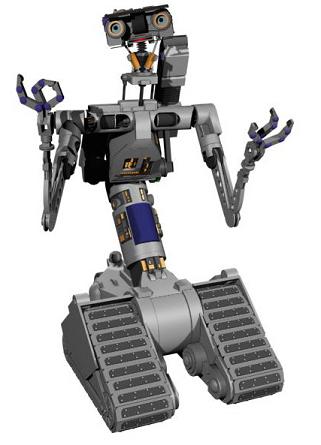
I've always had an interest in robotics, but never had the opportunity to explore it more in depth. I'm excited to be learning along with the new students. I hope I can learn enough to start to build my own robots. I've always wanted to build a Johnny 5. I might be able to by the end of this school year.

If you have any tips or tricks on mentoring a robotics team for the Middle School, please leave a comment or send me a tweet. I can use all the help I can get.


My Future Robot Build

Hugs and High Fives, 

NP

Friday, September 9, 2016

Learning Fun With @WoWeeWorld Robots

I've been luck to be able to play with a couple of cool robots the past couple of weeks from WowWee. They are the Coder MiP and the Codji. While I thought they were cool, the most important opinion was that of my awesome son Leo. He loved them and I will do my best to explain why he thought they were so cool. I will start with the Coder MiP. 


This little robot packs quite the programming and hardware punch. You might not think that by just looking at it, but it really does. The Coder MiP has the following features that are worth noting.

Beaconsense - This allows the robot to know its surroundings and the situations it is in. 

Gesturesense - It can sense movement in front of its eyes. 

Sound Detection - Coder MiP can be activated by the clap of your hands if you want. 

Gyroscope and Accelerometer - It stands up right on its wheels and can be given directions on how fast to go. 

I was not sure how the Coder MiP was going to balance itself on those two wheels, but once it was connected to my iPad via Bluetooth, it stood straight up without an issues. 

Coding the Coder MiP might sound like a hassle or a tough task, but it is a simple block coding system that is similar to Scratch. Leo, having had used Scratch in the past, simply starting moving the blocks around on the screen to get Coder MiP to do what he wanted. There is also a free drive mode, but Leo really preferred to code the robot to see what he could make it do. Here is a video of Leo using the Coder MiP. 


He had so much fun trying to figure out all of the different things he could make the Coder MiP do. There are plenty of different sounds that the Coder MiP can be instructed to perform and the movements allow for 360 turns and pauses between actions. It is a very simple system for young students interested in robotics. Leo learned about the cause and effect relationship of actions placed in code. Having it try to do a spin before coming to a complete stop caused it to fall over. Adding the pause button would allow it to make the turn the way he wanted. It was fun watching him figure it out on his own. 


The Coder MiP comes with a ramp and a serving dish which can be fun as kids learn to program and complete tasks using the Coder MiP and these extra tools.


The Coder MiP charges using a micro USB and you can get a little over an hour with constant use after a full charge. The app shows you the battery level and is free to download.


If you think that your students or children are not ready to dive into block coding, then Codji is a great place to start. Codji works on using emoticons (Emojis) to send instructions and elicit reactions from the robot. The app has many different features that Leo very much enjoyed plating with during the day. 


In the picture above, Leo is guiding Codji through a street. This is level one and Leo just needed to move him over two spaces. Leo had to count the spaces and select the right arrow twice to move the robot on the screen. As the levels increase, the paths become more difficult and require adding turns and movement in other directions. Leo liked trying to solve the maze each time. 


Here is a screen shot of the driver mode. You can take Codji out for a spin and have emojis show up on his screen/face. Leo loved to use the Devil emoji and have another emjoi stick his tongue out at me. 


This part of the app required Leo to watch Codji's face for an image and repeat the sequence on the app. This was easy at first, but it does get difficult the further along you play. It was a nice challenge for Leo to think about the Sequence of things and how to remember them.

The Codji runs on three AAA batteries and works best on a flat hard surface. Our carpet was ok, but the traction on hard floors is much better.

I think both of these robots from WowWee make a fun addition to any home or classroom looking to introduce students to a very simplified version of robotics. These are they types of toys that can really spark an interest in students and have them excited to follow a more in-depth path to robotics down the line.


WowWee did send these robots to me for the purpose of a review, but that does not make them any less awesome to me or to Leo.